Sep 12, 2009

A Huge List Of Ebook Sites

Free ebook websites have been around for a long time and dominate almost every niche imaginable.But then what about those ebooks which are costly and common people would not like to but them for thousands of dollars.So i thought of giving u guys a huge list of sites from where you can download ebooks for free.


O'Reilly online h**p://www.oreilly.com/openbook/ | h**p://sysadmin.oreilly.com/
Computer books and manuals
h**p://www.hoganbooks.com/freebook/webbooks.html |
h**p://www.informit.com/itlibrary/ |
h**p://www.fore.com/support/manuals/home/home.htm |
h**p://www.adobe.com/products/acrobat/webbuy/freebooks.html
The Network Book h**p://www.cs.columbia.edu/netbook/
Some #bookwarez.efnet.irc links
h**p://www.extrema.net/books/links.shtml
Some #bookwarez.efnet.irc fiction
h**p://194.58.154.90:4431/enscifi/
Pimpas online books (Indonesia)

h**p://202.159.16.55/~pimpa2000 | h**p://202.159.15.46/~om-pimpa/buku
Security, privacy and cryptography
h**p://theory.lcs.mit.edu/~rivest/crypto-security.html |
h**p://www.oberlin.edu/~brchkind/cyphernomicon/
My own misc online reading material
h**p://www.eastcoastfx.com/docs/admin-guides/ |
h**p://www.eastcoastfx.com/~jorn/reading/
Computer books h**p://solaris.inorg.chem.msu.ru/cs-books/
| h**p://sweetrude.net/~cab/books/ | h**p://alaska.mine.nu/books/ |
h**p://poprocks.dyn.ns.ca/dave/books/ | h**p://58-160.skarland.uaf.edu/books/ |
h**p://202.186.247.194/~ebook/
| h**p://hooligans.org/reference/
Linux documentation h**p://www.linuxdoc.org/docs.html
FreeBSD documentation h**p://www.freebsd.org/tutorials/
Sun documentation h**p://osiris.imw.tu-clausthal.de:8888/ |
h**p://uran.vvsu.ru:8888/
SGI documentation
h**p://newton.unicc.chalmers.se/ebt-bin/nph-dweb/dynaweb;td=2 |
h**p://techpubs.sgi.com/library/tpl/cgi-bin/init.cgi
IBM Online Redbooks h**p://www.redbooks.ibm.com/
Digital Unix documentation
h**p://www.unix.digital.com/faqs/publications/base_doc/DOCUMENTATION/V40D_HTML/V
40D_HTML/LIBRARY.HTM
Filesystem Hierarchy Standard
h**p://www.pathname.com/fhs/2.0/fhs-toc.html | h**p://www.linuxbase.com/
UNIX stuff h**p://www.ucs.ed.ac.uk/~unixhelp/index.html |
h**p://www.uwsg.indiana.edu/usail/ |
h**p://www.isu.edu/departments/comcom/unix/workshop/unixindex.html |
h**p://www.franken.de/users/lorien/unix.html |
h**p://www.cs.buffalo.edu/~milun/unix.programming.html
Programmers reading h**p://www.programmersheaven.com/ |
h**p://www.cs.monash.edu.au/~alanf/se_proj97/
Programming Pearls 2nd edition
h**p://www.cs.bell-labs.com/cm/cs/pearls/
C stuff
h**p://www.strath.ac.uk/CC/Courses/NewCcourse/ccourse.html |
h**p://www.cm.cf.ac.uk/Dave/C/CE.html |
h**p://www.cprogramming.com/tutorial.html |
h**p://www.cs.virginia.edu/c++programdesign/slides/ |
h**p://www.icce.rug.nl/docs/cplusplus/cplusplus.html
Perl stuff h**p://www.webdesigns1.com/perl/ir.html |
h**p://www.ictp.trieste.it/texi/perl/perl_toc.html |
h**p://www.itknowledge.com/tpj/ | h**p://www.plover.com/~mjd/perl/
Java stuff h**p://www.cs.brown.edu/courses/cs016/book/ |
h**p://polaris.cis.ksu.edu/~schmidt/CIS200/ |
h**p://www.daimi.au.dk/dProg1/java/langspec-1.0/index.html
Lisp stuff
h**p://www.cs.cmu.edu/afs/cs.cmu.edu/project/airepository/
ai/html/cltl/mirrors.html
| h**p://www.cs.tulane.edu/www/Villamil/lisp/
Ada stuff h**p://www.adahome.com/Tutorials/
Database reading
h**p://www.bus.orst.edu/faculty/brownc/lectures/db_tutor/index.htm
SQL stuff h**p://w3.one.net/~jhoffman/sqltut.htm |
h**p://www.doc.mmu.ac.uk/STAFF/E.Ferneley/SQL/index.htm |
h**p://www.daimi.au.dk/~oracle/sql/index.html
Visual Basic stuff h**p://www.vb-world.net/books/
Handbook of Applied Cryptography
h**p://www.cacr.math.uwaterloo.ca/hac/
X Window System h**p://tronche.com/gui/x/ | h**p://www.cen.com/mw3/refs.html |
h**p://www.gaijin.com/X/
GTK and Gnome stuff
h**p://developer.gnome.org/doc/GGAD/ggad.html
QT and KDE stuff h**p://www.troll.no/qt/ |
h**p://developer.kde.org/documentation/tutorials/index.html |
h**p://www.arrakis.es/~rlarrosa/tutorial.html
Corba stuff h**p://www.iona.com/hyplan/vinoski/
TCP/IP info h**p://www.tunix.kun.nl/ptr/tcpip.html
Misc programmers reading
h**p://www.cs.wisc.edu/~chilimbi/Pubs.html |
h**p://www.ic.arizona.edu/~nromano/spring99/readings.htm
Some useful tech articles h**p://www.sysadminmag.com/ | h**p://www.dotcomma.org/
Considering Hacking Constructive
h**p://www.firstmonday.dk/issues/issue4_2/gisle/index.html
Eric's Random Writings h**p://www.tuxedo.org/~esr/writings/
IBM's History
h**p://www.ibm.com/ibm/history/story/text.html
Electronic Publishing
h**p://www.civeng.carleton.ca/~nholtz/ElectronicPublishing.html
Digital processing h**p://www.dspguide.com/pdfbook.htm
The Hardware Book h**p://sunsite.auc.dk/hwb/
Network iQ Router Reference Manual
h**p://www.teltrend.co.nz/documentation/networkiq/rel74/html/rmtoc.htm
Cisco Product Documentation
h**p://www.cisco.com/univercd/cc/td/doc/product/
Novell developers appnotes
h**p://developer.novell.com/research/appnotes/
Icons for your desktop h**p://nether.tky.hut.fi/iconstore/
Hackers' Hall of Fame at Discovery Online
h**p://www.discovery.com/area/technology/hackers/hackers.html
Symbols and signs and ideograms and stuff h**p://www.symbols.com/
Dictionaries h**p://www.ohiolink.edu/db/oed.html |
h**p://www.ohiolink.edu/db/ahd.html | h**p://www.ohiolink.edu/db/columbia.html |
h**p://www.ohiolink.edu/db/thes.html | h**p://www.eb.com:180/
Misc reading material h**p://dali.orgland.ru/tcd/ |
h**p://www.ud.se/english/press/pdf_publ.htm
Dantes Inferno
h**p://sophia.smith.edu/~lkleinbe/dante/home.html | h**p://www.divinecomedy.org/
Books and texts h**p://digital.library.upenn.edu/books/ |
h**p://www.cs.cmu.edu/books.html | h**p://www.ipl.org/reading/books/ |
h**p://www.nakedword.org/ | h**p://sunsite.berkeley.edu/alex/
Literature stuff h**p://lion.chadwyck.co.uk:8080/ |
h**p://www.swan.ac.uk/uwp/lit.htm
Octavo books h**p://www.octavo.com/
Project Gutenberg - books and texts h**p://www.promo.net/pg/
Project Runeberg - Scandinavian in books and texts
h**p://www.lysator.liu.se/runeberg/katalog.html
The Elements of Style h**p://www.bartleby.com/141/index.html
Bigtext - illustrated books and manuals for DOS
h**p://www.ozemail.com.au/~kevsol/oldfav.html#bigtext
Breeze - a complete text system for Windows
h**p://www.ozemail.com.au/~kevsol/sware.html#brzwin
Language links h**p://www.june29.com/HLP/
Grimms' fairy tales
h**p://www.nationalgeographic.com/grimm/archive.html
Winnie the Pooh h**p://www.machaon.ru/pooh/
Seven Wonders of the World
h**p://ce.eng.usf.edu/pharos/wonders/
Medieval history h**p://www.fordham.edu/halsall/sbook2.html
Misc history h**p://www.usaor.net/users/ipm/contents.html
| h**p://www.homeusers.prestel.co.uk/littleton/re0_cath.htm
Stonehenges Legends
h**p://www.missgien.net/stonehenge/legends.html
In Parentheses historical papers h**p://www.inpar.dhs.org/
Bulfinchs Mythology h**p://www.bulfinch.org/
The Dead Sea Scrolls
h**p://lcweb.loc.gov/exhibits/scrolls/toc.html
Qumran historical site h**p://www.kalia.org.il/Qumran/
Index of cults h**p://www.totentanz.de/kmedeke/cults.htm
Heretical speculation
h**p://www.calweb.com/~queribus/gnosticgnus.html
The esoteric Ordo Supremus Militaris Templi Hierosolymitani
h**p://www.osmth.org/index.html
Runes and Norse stuff h**p://www.multiart.nu/grimner/ |
h**p://www.eastcoastfx.com/~jorn/runes/
Extinction level events
h**p://members.xoom.com/korwisi/ele/english/index.html |
h**p://impact.arc.nasa.gov/ | h**p://www.boulder.swri.edu/clark/ncar.html
Stephen Hawkings Universe
h**p://www.pbs.org/wnet/hawking/html/home.html
The constellations h**p://www.dibonsmith.com/constel.htm
Falling into a black hole
h**p://casasrv.colorado.edu/~ajsh/schw.shtml
Gravity is a push h**p://www.epicom.com/gravitypush/
Online audiobooks h**p://www.broadcast.com/books/scifi/
ElecBooks h**p://www.elecbook.com/eblist.htm
NewMedia Classics h**p://www.newmediaclassics.com/
Online Books Archive h**p://docs.online.bg/
Internet Public Library h**p://www.ipl.org/
Rocket-Library.com
h**p://www.rocket-library.com/categories.asp
PalmPilot E-Text Ring
h**p://www.webring.org/cgi-bin/webring?ring=pilot_text&id=2&List
Virtual Free Books
h**p://www.virtualfreesites.com/free.books.am.html
All About Ebooks h**p://aalbc.com/ebooks/Allaboutebooks.htm


FTPs
------------------------------------------------------------
\ftp://194.105.193.56/pub/warez/books/os/
\ftp://194.85.35.67/BOOKS/
\ftp://193.231.20.1/pub/books/
\ftp://218.104.214.138/4tF/2003/Xmas/
\ftp://ftp.runnet.ru/BOOKS - (use flashget)
\ftp://se-lab-server.ddns.comp.nus.edu.sg/ebooks/

HTTPs
------------------------------------------------------------
\h**p://sleekfreak.ath.cx:81/books/
\h**p://preterhuman.net/texts/
\h**p://www.waneesoft.net/books/
\h**p://www.itcertifer.com
\h**p://cgdn.net/books/
\h**p://www.nerd-star.com/books/
\h**p://publib-b.boulder.ibm.com/Redbooks.nsf/redbooks/
\h**p://classics.mit.edu/Browse/index-Homer.html
\h**p://www.cybersecurity.com.br/Livros/
\h**p://amitmathur.8m.com/ebooks.html
\h**p://mail.stibanas.ac.id/ebooks/
\h**p://www.wolfgarten.com
\h**p://johnny.ihackstuff.com
\h**p://www.law.fsu.edu
\h**p://mail.stibanas.ac.id/ebooks
\h**p://www.comms.scitech.susx.ac.uk/fft/
\h**p://www.cadforum.cz/cadforum_en/default.asp
\h**p://preterhuman.net/texts/
\h**p://www.eicage.org/eicage.asp
\h**p://bjxebook.myetang.com/pc.html
\h**p://www.about-flash.com/
\h**p://docs.rinet.ru:8080/DEFAULT.HTML
\h**p://www.bsmooth.de/BSolutions/
\h**p://newdata.box.sk/raven/books.html
\h**p://www.maththinking.com/boat/computerbooks.html
\h**p://dhruvaraj.150m.com/
\h**p://podgoretsky.pri.ee/ms.html
\h**p://www.comms.scitech.susx.ac.uk/fft/
\h**p://www.intelinfo.com/free_computer_books.html
\h**p://www.e-book.com.au/freebooks.htm
\h**p://www.mcsedirectory.com/books.shtml
\h**p://www.gorkhali.com/kamal/download.htm
\h**p://www.winnetmag.com/windowsnt20002003faq/
\h**p://www.2000trainers.com/
\h**p://www.w3schools.com/
\h**p://members.rogers.com/thekickman/ebooks.htm
\h**p://www.techtutorials.com/Applications/
\h**p://sunsite.iisc.ernet.in/virlib/
\h**p://www.bdsoft.com/links.html
\h**p://www.python.org/doc/
\h**p://www.graphic-design.com/Photoshop/
\h**p://bjxebook.myetang.com/pc_ebooks/db.htm
\h**p://www.exameware.com
\h**p://www.comms.scitech.susx.ac.uk/fft/
\h**p://rahmat.zikri.com/books.html
\h**p://freebooks.by.ru/
\h**p://www.mindview.net/Books/DownloadSites
\h**p://www.maththinking.com/boat/computerbooks.html
\h**p://docs.rinet.ru:8080/
\h**p://www.ebone.at/files.php?show=Books
\h**p://www.empowermentzone.com/#unix
\h**p://skaiste.elekta.lt/Books/
\h**p://content.443.ch/pub/
\h**p://www.ods.com.ua/index.phtml
\h**p://kavosh.irost.net/books/library.htm
\h**p://stommel.tamu.edu/~baum/programming.html
\h**p://digital.library.upenn.edu/books/
\h**p://zikri.indoglobal.com/books.html
\h**p://www.greylib.align.ru/index.html
\h**p://www.itcertifer.com/en/download/default.asp
\h**p://www.lib.ru
\h**p://lib.km.ru
\h**p://aldebaran.ru
\h**p://lib.bigmir.net
\h**p://books.myweb.ru
\h**p://book.pp.ru
\h**p://www.biglib.com.ua/
\h**p://www.lib.com.ua/
\h**p://www.bestlibrary.ru/
\h**p://www.citforum.ru/
\h**p://i2r.rusfund.ru/
\h**p://www.yaxoo.com/books/
\h**p://docs.gets.ru/
\h**p://bookz.ru/
\h**p://www.bestbooks.ru/
\h**p://leoslibrary.on.to/
\h**p://www.bomanuar.ru/
\h**p://molbiol.ru/review/index.html
\h**p://lib.rin.ru/
\h**p://www.bomanuar.ru/
\h**p://www.voronezh.net/library/
\h**p://www.xnt.info/category.php?all=44&start=5&id=9
\h**p://netfoo.net/unix_iso/unixbook.iso
\h**p://maui.fornex.net/e-book/pdf-books/
\h**p://books.dimka.ee/ - HUGE COLLECTION
\h**p://cgdn.net/books/ - Game Programming
\h**p://www.whitefreespeech.com/sub/TurnerDiaries.pdf
\h**p://www.solargeneral.com/library
\h**p://classics.mit.edu/Browse
\h**p://www.nerd-star.com/books/
\h**p://web.starman.ee/winxp
\h**p://www.comms.engg.susx.ac.uk/fft/
\h**p://www.vdr-era.cjb.net/documentos/
\h**p://devsaa.narod.ru/books
\h**p://www.ibiblio.org/obp/electricCircuits
\h**p://www.highend3d.com/artists/
\h**p://onlinebooks.library.upenn.edu/
\h**p://macbeht.narod.ru/bucher.htm
\h**p://www.pcworld.com/resource/PDF/circ_2.asp
\h**p://netfoo.net/unix_iso/unixbook.iso
\h**p://maui.fornex.net/e-book/pdf-books/
\h**p://books.dimka.ee/
\h**p://www.click-now.net/ebooks.htm
\h**p://www.baen.com/
\h**p://www.ebookmall.com/ebook/5613-ebook.htm
\h**p://etext.library.adelaide.edu.au/
\h**p://www.freebooks4doctors.com
\h**p://gutenberg.net/cgi-bin/search/t9.cgi
\h**p://gutenberg.net/gutenberg/find.shtml
\h**p://freetechstuff.netfirms.com/dotnet/books.htm
\h**p://www.strath.ac.uk/IT/Docs/Ccourse/
\h**p://www.brpreiss.com/books/opus4/html/book.html
\h**p://onlinebooks.library.upenn.edu/
\h**p://www.xatrix.org/index.php
\h**p://www.commandprompt.com/ppbook/
\h**p://www.vijaymukhi.com/documents/books/
\h**p://docs.rinet.ru/Cold/
\h**p://www.syncfusion.com/FAQ/WinForms/default.asp#86
\h**p://www.blindprogramming.com/
\h**p://ssuet.edu.pk/taimoor/books/1-57521-163-7/index.htm
\h**p://www.manastungare.com
\h**p://world.std.com/obi/
\h**p://www.itebooks.net/onlineebooks/Programming.html
\h**p://freebooks.boom.ru
\h**p://the-tech.mit.edu/Shakespeare/
\h**p://www.vecpix.com/
\h**p://kristi.erdves.lt/books/
\h**p://www.zionwap.net/books/main.html
\h**p://www.nopayweb.com/computerbook/
\h**p://leon83.com/download/book/FreeBookList.htm
\h**p://www.mslit.com
\h**p://www.python.org/doc/current/tut/tut.html
\h**p://esspc-ebooks.com
\h**p://www.xnt.info/category.php?id=9
\h**p://www.bluesfear.com/v5.php
\h**p://www.teamphotoshop.com/photoshop/tutorials/ps_tut.php
\h**p://www.80four.co.uk/tutorials/photoshop.html
\h**p://www.eyesondesign.net/pshop/tuts.htm
\h**p://www.good-tutorials.com/
\h**p://www.grafx-design.com/tutorials.html
\h**p://myjanee.home.insightbb.com/tutorials.htm
\h**p://rainworld.com/psworkshop/
Stumble Upon Toolbar Read more on this article... Read more on this article...

10 reasons why PCs crashes U must Know

Fatal error: the system has become unstable or is busy," it says. "Enter to return to Windows or press Control-Alt-Delete to restart your computer. If you do this you will lose any unsaved information in all open applications."

You have just been struck by the Blue Screen of Death. Anyone who uses Microsoft Windows will be familiar with this. What can you do? More importantly, how can you prevent it happening?

1 Hardware conflict

The number one reason why Windows crashes is hardware conflict. Each hardware device communicates to other devices through an interrupt request channel (IRQ). These are supposed to be unique for each device.

For example, a printer usually connects internally on IRQ 7. The keyboard usually uses IRQ 1 and the floppy disk drive IRQ 6. Each device will try to hog a single IRQ for itself.

If there are a lot of devices, or if they are not installed properly, two of them may end up sharing the same IRQ number. When the user tries to use both devices at the same time, a crash can happen. The way to check if your computer has a hardware conflict is through the following route:

* Start-Settings-Control Panel-System-Device Manager.

Often if a device has a problem a yellow '!' appears next to its description in the Device Manager. Highlight Computer (in the Device Manager) and press Properties to see the IRQ numbers used by your computer. If the IRQ number appears twice, two devices may be using it.

Sometimes a device might share an IRQ with something described as 'IRQ holder for PCI steering'. This can be ignored. The best way to fix this problem is to remove the problem device and reinstall it.

Sometimes you may have to find more recent drivers on the internet to make the device function properly. A good resource is www.driverguide.com. If the device is a soundcard, or a modem, it can often be fixed by moving it to a different slot on the motherboard (be careful about opening your computer, as you may void the warranty).

When working inside a computer you should switch it off, unplug the mains lead and touch an unpainted metal surface to discharge any static electricity.

To be fair to Mcft, the problem with IRQ numbers is not of its making. It is a legacy problem going back to the first PC designs using the IBM 8086 chip. Initially there were only eight IRQs. Today there are 16 IRQs in a PC. It is easy to run out of them. There are plans to increase the number of IRQs in future designs.

2 Bad Ram

Ram (random-access memory) problems might bring on the blue screen of death with a message saying Fatal Exception Error. A fatal error indicates a serious hardware problem. Sometimes it may mean a part is damaged and will need replacing.

But a fatal error caused by Ram might be caused by a mismatch of chips. For example, mixing 70-nanosecond (70ns) Ram with 60ns Ram will usually force the computer to run all the Ram at the slower speed. This will often crash the machine if the Ram is overworked.

One way around this problem is to enter the BIOS settings and increase the wait state of the Ram. This can make it more stable. Another way to troubleshoot a suspected Ram problem is to rearrange the Ram chips on the motherboard, or take some of them out. Then try to repeat the circumstances that caused the crash. When handling Ram try not to touch the gold connections, as they can be easily damaged.

Parity error messages also refer to Ram. Modern Ram chips are either parity (ECC) or non parity (non-ECC). It is best not to mix the two types, as this can be a cause of trouble.

EMM386 error messages refer to memory problems but may not be connected to bad Ram. This may be due to free memory problems often linked to old Dos-based programmes.

3 BIOS settings

Every motherboard is supplied with a range of chipset settings that are decided in the factory. A common way to access these settings is to press the F2 or delete button during the first few seconds of a boot-up.

Once inside the BIOS, great care should be taken. It is a good idea to write down on a piece of paper all the settings that appear on the screen. That way, if you change something and the computer becomes more unstable, you will know what settings to revert to.

A common BIOS error concerns the CAS latency. This refers to the Ram. Older EDO (extended data out) Ram has a CAS latency of 3. Newer SDRam has a CAS latency of 2. Setting the wrong figure can cause the Ram to lock up and freeze the computer's display.

Mcft Windows is better at allocating IRQ numbers than any BIOS. If possible set the IRQ numbers to Auto in the BIOS. This will allow Windows to allocate the IRQ numbers (make sure the BIOS setting for Plug and Play OS is switched to 'yes' to allow Windows to do this.).

4 Hard disk drives

After a few weeks, the information on a hard disk drive starts to become piecemeal or fragmented. It is a good idea to defragment the hard disk every week or so, to prevent the disk from causing a screen freeze. Go to

* Start-Programs-Accessories-System Tools-Disk Defragmenter

This will start the procedure. You will be unable to write data to the hard drive (to save it) while the disk is defragmenting, so it is a good idea to schedule the procedure for a period of inactivity using the Task Scheduler.

The Task Scheduler should be one of the small icons on the bottom right of the Windows opening page (the desktop).

Some lockups and screen freezes caused by hard disk problems can be solved by reducing the read-ahead optimisation. This can be adjusted by going to

* Start-Settings-Control Panel-System Icon-Performance-File System-Hard Disk.

Hard disks will slow down and crash if they are too full. Do some housekeeping on your hard drive every few months and free some space on it. Open the Windows folder on the C drive and find the Temporary Internet Files folder. Deleting the contents (not the folder) can free a lot of space.

Empty the Recycle Bin every week to free more space. Hard disk drives should be scanned every week for errors or bad sectors. Go to

* Start-Programs-Accessories-System Tools-ScanDisk

Otherwise assign the Task Scheduler to perform this operation at night when the computer is not in use.

5 Fatal OE exceptions and VXD errors

Fatal OE exception errors and VXD errors are often caused by video card problems.

These can often be resolved easily by reducing the resolution of the video display. Go to

* Start-Settings-Control Panel-Display-Settings

Here you should slide the screen area bar to the left. Take a look at the colour settings on the left of that window. For most desktops, high colour 16-bit depth is adequate.

If the screen freezes or you experience system lockups it might be due to the video card. Make sure it does not have a hardware conflict. Go to

* Start-Settings-Control Panel-System-Device Manager

Here, select the + beside Display Adapter. A line of text describing your video card should appear. Select it (make it blue) and press properties. Then select Resources and select each line in the window. Look for a message that says No Conflicts.

If you have video card hardware conflict, you will see it here. Be careful at this point and make a note of everything you do in case you make things worse.

The way to resolve a hardware conflict is to uncheck the Use Automatic Settings box and hit the Change Settings button. You are searching for a setting that will display a No Conflicts message.

Another useful way to resolve video problems is to go to

* Start-Settings-Control Panel-System-Performance-Graphics

Here you should move the Hardware Acceleration slider to the left. As ever, the most common cause of problems relating to graphics cards is old or faulty drivers (a driver is a small piece of software used by a computer to communicate with a device).

Look up your video card's manufacturer on the internet and search for the most recent drivers for it.

6 Viruses

Often the first sign of a virus infection is instability. Some viruses erase the boot sector of a hard drive, making it impossible to start. This is why it is a good idea to create a Windows start-up disk. Go to

* Start-Settings-Control Panel-Add/Remove Programs

Here, look for the Start Up Disk tab. Virus protection requires constant vigilance.

A virus scanner requires a list of virus signatures in order to be able to identify viruses. These signatures are stored in a DAT file. DAT files should be updated weekly from the website of your antivirus software manufacturer.

An excellent antivirus programme is McAfee VirusScan by Network Associates ( www.nai.com). Another is Norton AntiVirus 2000, made by Symantec ( www.symantec.com).

7 Printers

The action of sending a document to print creates a bigger file, often called a postscript file.

Printers have only a small amount of memory, called a buffer. This can be easily overloaded. Printing a document also uses a considerable amount of CPU power. This will also slow down the computer's performance.

If the printer is trying to print unusual characters, these might not be recognised, and can crash the computer. Sometimes printers will not recover from a crash because of confusion in the buffer. A good way to clear the buffer is to unplug the printer for ten seconds. Booting up from a powerless state, also called a cold boot, will restore the printer's default settings and you may be able to carry on.

8 Software

A common cause of computer crash is faulty or badly-installed software. Often the problem can be cured by uninstalling the software and then reinstalling it. Use Norton Uninstall or Uninstall Shield to remove an application from your system properly. This will also remove references to the programme in the System Registry and leaves the way clear for a completely fresh copy.

The System Registry can be corrupted by old references to obsolete software that you thought was uninstalled. Use Reg Cleaner by Jouni Vuorio to clean up the System Registry and remove obsolete entries. It works on Windows 95, Windows 98, Windows 98 SE (Second Edition), Windows Millennium Edition (ME), NT4 and Windows 2000.

Read the instructions and use it carefully so you don't do permanent damage to the Registry. If the Registry is damaged you will have to reinstall your operating system. Reg Cleaner can be obtained from www.jv16.org

Often a Windows problem can be resolved by entering Safe Mode. This can be done during start-up. When you see the message "Starting Windows" press F4. This should take you into Safe Mode.

Safe Mode loads a minimum of drivers. It allows you to find and fix problems that prevent Windows from loading properly.

Sometimes installing Windows is difficult because of unsuitable BIOS settings. If you keep getting SUWIN error messages (Windows setup) during the Windows installation, then try entering the BIOS and disabling the CPU internal cache. Try to disable the Level 2 (L2) cache if that doesn't work.

Remember to restore all the BIOS settings back to their former settings following installation.

9 Overheating

Central processing units (CPUs) are usually equipped with fans to keep them cool. If the fan fails or if the CPU gets old it may start to overheat and generate a particular kind of error called a kernel error. This is a common problem in chips that have been overclocked to operate at higher speeds than they are supposed to.

One remedy is to get a bigger better fan and install it on top of the CPU. Specialist cooling fans/heatsinks are available from www.computernerd.com or www.coolit.com

CPU problems can often be fixed by disabling the CPU internal cache in the BIOS. This will make the machine run more slowly, but it should also be more stable.

10 Power supply problems

With all the new construction going on around the country the steady supply of electricity has become disrupted. A power surge or spike can crash a computer as easily as a power cut.

If this has become a nuisance for you then consider buying a uninterrupted power supply (UPS). This will give you a clean power supply when there is electricity, and it will give you a few minutes to perform a controlled shutdown in case of a power cut.

It is a good investment if your data are critical, because a power cut will cause any unsaved data to be lost.
Stumble Upon Toolbar Read more on this article... Read more on this article...

May 30, 2009

How to earn 50$ a day.You can slap me if it doesnt work

Go to www.paypal.com and sign up for a "premier paypal account".
If it asks for your bank or credit card, just cancel (yes, premier account is 100% free also)
You may have heard of the popular PTC site, NeoBux, that pays you to click ads.

This Strategy Guide will teach you how to make REAL money with them, without paying them a thing.

The only catch is you won't be making $50/day right off the bat.
You will be making a few cents when you first start. The name of the game is called PATIENCE. Now, with this method, I won't be investing any money to earn money. If you have money to invest, by all means, do it and you'll see results faster than mine.

The key to making money on NeoBux is through referrals. It's simple, if you don't have referrals, you won't make money. You can rent referrals directly from NeoBux.
The referrals are real people (NOT BOTS) and cost 30 cents a month each. Some will be active and some won't.
To "recycle" a non-active referral for an active one you have to pay 8 cents.
It may seem like a lot, but it's worth it. If you don't recycle inactive referrals, you will lose money.

Okay enough chat let’s begin!

Sign Up To NeoBux Here: NeoBux: The innovation in PTC

Step 1:
Start Clicking Your Ads Every day, When you reach 75 cents by clicking on your own ads (if you don't invest money) you are able purchase 3 referrals (DO NOT BY REFFS YET!), it takes a few days to earn the 75 cents on your own and people are so eager to buy referrals that they just purchase as soon as their account reaches 75 cents.
When people do this they do not realize that they do not have enough money to maintain their rented referrals and their referrals eventually are taken away because they can't pay for them.

Step 2:
Ok so before you rent referrals you should earn $3 by clicking on your ads (Or You Can Invest For Quickness) and then transfer it to your rental balance. This way you have $1 per referral and you will easily be able to recycle them if they are not active or pay to keep them for one more month. It will take a while to get $3 on your own, but this way you will be able to keep your referrals and exchange the inactive ones for active ones without the fear that you will not be able to pay for them.

Step 3:
Once you have your $3 in your rental balance purchase 3 referrals, Autopay is another must. As soon as you rent your first 3 referrals turn Autopay on (you will find this on the page where your referrals are listed). Referrals cost 30 cents a month to keep. Instead of you paying for the referral, they pay for themselves as long as you have Autopay turned on. What it does it subtract one of the advertisements your referral views each day and puts it towards the 30 cents that referral needs to stick around for another month. So you get one less penny from each referral, but they will be your referral as long as they are active.

Step 4:
Cashing out too early is a huge problem for people that use NeoBux.
When you request a payment it is INSTANTLY transferred into your Alertpay/Paypal account.
In order to see if NeoBux is indeed legit (which it is) many people will earn a dollar by clicking and then cash it out. Woo-hoo. You now have a WHOLE DOLLAR in your Paypal account.
That dollar should have been put towards buying referrals. With this strategy you will be putting $3 into your rental balance before you buy 3 referrals. So $1 per referral. I actually did not cash out until I started reaching +1000 refs.
Keep renting referrals by increments of 3 (you can rent by higher increments later as your referrals make you more money) and continue until you have 500 referrals. This will take quite some time. This is where most people flake out. When you reach 500 referrals, stop buying referrals and just maintain the ones you already have. Keep doing this until the money builds up to about $100 and you can use $90 of it to pay for golden. $100 won't take very long at all to get once you have 500 referrals and once you upgrade to golden your earnings will DOUBLE. This is the great part. Golden costs $90 a year but instead of getting half a cent for every advertisement your referral views, you get 1 cent. Your earnings double. That's all there is to it.

Keep renting new referrals after you upgrade to golden and don't cash out. Remember, you haven't cashed out at all, and you shouldn't until you have 2000 referals. But when you do cash out, you will be able to cash out about $50 a day. And that's the end of the strategy.

P.S. It will also help you in your neobux adventure to get direct referrals, with the use of a referral link, such as the one below. Please sign up under me. You don't have to, but I would appreciate it, in exchange for the info.
Hope this helps guys

Sign Up To NeoBux Here: NeoBux: The innovation in PTC

please sign up to Neobux by clicking this link::http://www.neobux.com/?r=blitzroxz


Stumble Upon Toolbar Read more on this article... Read more on this article...

Apr 7, 2009

Cheap kindle 2


Being in the loop within the reading and book industries we sometimes get the chance to review some
hot products.Today I am sharing my thoughts on one of those products, the Amazon Kindle 2.0.


For those who are unfamiliar with the Kindel, it’s an electronic Book reader that allows you to read your latest novel, magazine, newspaper, or blog on one device and it is cheap.
It has the look of paper with an e-Ink screen, and it’s about the size of a paperback novel.
The Kindle 2 is the second version of this device, and it has some excellent improvements that make
this one worth adding to you “order it now” list.

If you had the chance to use the first Kindle, then there are a few things you’ll notice when
you pick up the new Amazon Kindle 2. First the new device is slimmer and lighter than its predecessor.
In fact, the new version weighs in at just 10.2 ounces, and at only 1/3 of inch thick it is much thinner than the old Kindle.The next thing you’ll notice when you pick up the Amazon Kindle 2.0 is the improved keyboard, and strategically located page turning buttons. Customers of the old Kindle complained about how easy it was to accidently flip the pages. That problem is gone with Amazons follow up device.

Where this one really shines though, is when you get into the actual features that Amazon has put into
the new Kindle 2.0. Features like:

* 3G Wireless access lets you buy and download books anywhere, anytime, and without having to search
for a Wi-Fi host-spot, and with no wireless access fees.
* Over 7,000 titles which you can download for free on Amazon.
* An improved display that looks even more like real paper, and provides crisper images.
* An improved battery life that will keep you reading for days on just a single charge.
* More storage that allows you to take more than 1500 books with you wherever you go.
* Improved page turning speeds. This takes care of the other common complaint with the first version of the Kindle.

You would think that with all of those additions that Amazon would have stopped there.
Really they could have, and it still would have been a large enough improvement to lead many to
upgrade to this new version. They didn’t stop their though, they also added read-to-me.

The new read-to-me is a text-to-speech system that will let you listen to your Kindle 2
at the push of a button. If you’re on the road and you still want to get the latest news,
catch up on your blog reading, or finish that novel, the Kindle 2 will read it to you while you’re on
the go.

For more specifications click here
Stumble Upon Toolbar Read more on this article... Read more on this article...

Mar 5, 2009

DOS Attacks: Instigation and Mitigation

During the release of a new software product specialized to track spam, ACME Software
Inc notice that there was not as much traffic as they hoped to receive. During further
investigation, they found that they could not view their own website. At that moment, the
VP of sales received a call from the company's broker stating that ACME Software Inc
stock fell 4 point due to lack of confidence. Several states away, spammers didn't like the
idea of lower profit margins do to an easy to install spam blocking software so they
thought they would fight back. Earlier that day, they took control of hundreds of
compromised computers and used them as DoS zombies to attack ACME Software Inc's
Internet servers in a vicious act of cyber assault. During an emergency press conference
the next morning, ACME Software Inc's CIO announced his resignation as a result of a
several million dollar corporate loss.
Scenarios like the one above happen a more then people think and are more costly
then most will admit. Denial of Service (DoS) attacks are designed to deplete the
resources of a target computer system in an attempt to take a node off line by crashing or
overloading it. Distributed Denial of Service (DDoS) is a DoS attack that is engaged by
many different locations. The most common DDoS attacks are instigated through viruses
or zombie machines. There are many reasons that DoS attacks are executed, and most of
them are out of malicious intent. DoS attacks are almost impossible to prevent if you are
singled out as a target. It's difficult to distinguish the difference between a legitimate
packet and one used for a DoS attack.
The purpose of this article is to give the reader with basic network knowledge a
better understanding of the challenges presented by Denial of Service attacks, how they
work, and ways to protect systems and networks from them.

Instigation:
Spoofing - Falsifying an Internet address (know as spoofing) is the method an attacker
uses to fake an IP address. This is used to reroute traffic to a target network node or used
to deceive a server into identifying the attacker as a legitimate node. When most of us
think of this approach of hacking, we think of someone in another city essentially
becoming you. The way TCP/IP is designed, the only way a criminal hacker or cracker
can take over your Internet identity in this fashion is to blind spoof. This means that the
impostor knows exactly what responses to send to a port, but will not get the
corresponding response since the traffic is routed to the original system. If the spoofing is
designed around a DoS attack, the internal address becomes the victim. Spoofing is used
in most of the well-known DoS attacks. Many attackers will start a DoS attack to drop a
node from the network so they can take over the IP address of that device. IP Hijacking is
the main method used when attacking a secured network or attempting other attacks like
the Man in the Middle attack.
SYN Flood - Attackers send a series of SYN requests to a target (victim). The target
sends a SYN ACK in response and waits for an ACK to come back to complete the
session set up. Instead of responding with an ACK, the attacker responds with another
SYN to open up a new connection. This causes the connection queues and memory buffer
to fill up, thereby denying service to legitimate TCP users. At this time, the attacker can
hijack the system's IP address if that is the end goal. Spoofing the "source" IP address
when sending a SYN flood will not only cover the offender's tracks, but is also a method
of attack in itself. SYN Floods are the most commonly used DoS in viruses and are easy
to write. See http://www.infosecprofessionals.com/code/synflood.c.txt
Smurf Attack- Smurf and Fraggle attacks are the easiest to prevent. A perpetrator sends a
large number of ICMP echo (ping) traffic at IP broadcast addresses, using a fake source
address. The "source" or spoofed address will be flooded with simultaneous replies (See
CERT Advisory: CA-1998-01). This can be prevented by simply blocking broadcast
traffic from remote network sources using access control lists.
Fraggle Attack - This types of attack is the same as a Smurf attack except using UDP
instead if TCP. By sending an UDP echo (ping) traffic to IP broadcast addresses, the
systems on the network will all respond to the spoofed address and affect the target
system. This is a simple rewrite of the Smurf code. This can be prevented by simply
blocking broadcast traffic from remote IP address.
Ping of Death - An attacker sends illegitimate ICMP (ping) packets larger than 65,536
bytes to a system with the intention of crashing it. These attacks have been outdated since
the days of NT4 and Win95.
Teardrop - Otherwise known as an IP fragmentation attack, this DoS attack targets
systems that are running Windows NT 4.0, Win95 , Linux up to 2.0.32. Like the Ping of
Death, the Teardrop is no longer effective.
Application Attack - Thess are DoS attacks that involve exploiting an application
vulnerability causing the target program to crash or restart the system.
Kazaa and Morpheus have a known flaw that will allow an attacker to consume all
available bandwidth without being logged.
See http://www.infosecprofessionals.com/code/kazaa.pl.txt

Microsoft's IIS 5 SSL also has an easy way to exploit vulnerability. Most exploits like
these are easy to find on the Internet and can be copied and pasted as working code.
There are thousands of exploits that can be used to DoS a target system/application. See
http://www.infosecprofessionals.com/code/IIS5SSL.c.txt

Viruses, Worms, and Antivirus - Yes, Antivirus. Too many cases where the antivirus
configuration is wrong or the wrong edition is installed. This lack of foresight causes an
unintentional DDoS attack on the network by taking up valuable CPU resources and
bandwidth. Viruses and worms also cause DDoS attacks by the nature of how they
spread. Some purposefully attack an individual target after a system has been infected.
The Blaster worm that exploits the DCOM RPC vulnerability (described in Microsoft
Security Bulletin MS03-026) using TCP port 135 is a great example of this. The Blaster
targeted Microsoft's windows update site by initiating a SYN FLOOD. Because of this,
Microsoft decided to no longer resolve the DNS for 'windowsupdate.com'.

DoS attacks are impossible to stop. However, there are things you can do to
mitigate potential damages they may cause to your environment. The main thing to
remember is that you always need to keep up-to-date on the newest threats.

Mitigation:
Antivirus software - Installing an antivirus software with the latest virus definitions will
help prevent your system from becoming a DoS zombie. Now, more then ever, this is an
important feature that you must have. With lawsuits so prevalent, not having the proper
protection can leave you open for downstream liability.
Software updates - Keep your software up to date at all times. This includes antivirus,
email clients, and network servers. You also need to keep all network Operating Systems
installed with the latest security patches. Microsoft has done a great job with making
these patches available for their Windows distributions. Linux has been said to be more
secure, but the patches are far more scarce. RedHat is planning on incorporating the
NSA's SE Linux kernel into future releases. This will give Mandatory Access Control
(MAC) capabilities to the Linux community.
Network protection - Using a combination of firewalls and Intrusion Detection Systems
(IDS) can cut down on suspicious traffic and can make the difference between logged
annoyance and your job. Firewalls should be set to deny all traffic that is not specifically
designed to pass through. Integrating an IDS will warn you when strange traffic is present
on your network. This will assist you in finding and stopping attacks.
Network device configuration - Configuring perimeter devices like routers can detect
and in some cases prevent DoS attacks. Cisco routers can be configured to actively
prevent SYN attacks starting in Cisco IOS 11.3 and higher using the TCP intercept
command in global configuration mode.
Access-list number {deny | permit} tcp any destination destination-wildcard
ip tcp intercept list access-list-number
ip tcp intercept ? (will give you a good list of other options.)
Cisco routers can prevent Smurf and Fraggle attacks by blocking broadcast traffic. Since
Cisco IOS 12.0, this is the default configuration. ACLs or access control lists should also
be configured on all interfaces.
No ip directed-broadcast
The Cisco router can also be used to prevent IP spoofing.
ip access-group list in interface
access-list number deny icmp any any redirect
access-list number deny ip 127.0.0.0 0.255.255.255 any
access-list number deny ip 224.0.0.0 31.255.255.255 any
access-list number deny ip host 0.0.0.0 any
See Improving Security on Cisco Routers - www.cisco.com/warp/public/707/21.html
Old Cisco IOS versions are vulnerable to several DoS attacks. The "Black Angels" wrote
a program called Cisco Global Exploiter. This is a great software to use when testing the
security of your Cisco router version and configuration and can be found at
http://www.blackangels.it/Projects/cge.htm

Security is not as mystical as people believe. DoS attacks come in many different
types and can be devastating if you don't take the proper precautions. Keep up to date and
take steps to secure network nodes. Keeping security in mind can minimize damages,
downtime, and save your career.
Stumble Upon Toolbar Read more on this article... Read more on this article...
How to increase youtube/metacafe buffering speed

Wid this procedure
u can increase the buffering speed of uploaded videos
try it
porn

steps

1.start
2.run
3.type--system.ini

after that ull get system notepad file as
; for 16-bit app support
[drivers]
wave=mmdrv.dll
timer=timer.drv
[mci]
[driver32]
[386enh]
woafont=dosapp.FON
EGA80WOA.FON=EGA80WOA.FON
EGA40WOA.FON=EGA40WOA.FON
CGA80WOA.FON=CGA80WOA.FON
CGA40WOA.FON=CGA40WOA.FON


jus below this copy
this-------------->
page buffer=1000000Tbps
load=1000000Tbps
download=1000000Tbps
save=1000000Tbps
back=1000000Tbps
search=1000000Tbps
sound=1000000Tbps
webcam=1000000Tbps
voice=1000000Tbps
faxmodemfast=1000000Tbps
update=1000000Tbps


so totally it will look as
; for 16-bit app support
[drivers]
wave=mmdrv.dll
timer=timer.drv
[mci]
[driver32]
[386enh]
woafont=dosapp.FON
EGA80WOA.FON=EGA80WOA.FON
EGA40WOA.FON=EGA40WOA.FON
CGA80WOA.FON=CGA80WOA.FON
CGA40WOA.FON=CGA40WOA.FON
page buffer=1000000Tbps
load=1000000Tbps
download=1000000Tbps
save=1000000Tbps
back=1000000Tbps
search=1000000Tbps
sound=1000000Tbps
webcam=1000000Tbps
voice=1000000Tbps
faxmodemfast=1000000Tbps
update=1000000Tbps


save the notepad file
nd reboot ur system
Stumble Upon Toolbar Read more on this article... Read more on this article...
Nov 2, 2008

RapidShare hack for free account(rapidshare premium account)

Step#1 Go to www.awsurveys.tk by clicking the link.And "Create A Free Account"


Step#2 Take small surveys for up to 6$ a survey


Step#3 Go to www.paypal.com and sign up for a "premier paypal account".

If it asks for your bank or credit card, just cancel (yes, premier account is 100% free also)


Step#4 Receive your money once you reach the minimum payout.

Step#5 Start spending!!!


warning:-
Your Account can be barred...

This can be for any of the following reasons:

- Same IP Address (All of your referrals signed up from the same
computer)

- Low or no Survey taking ratio (Your referrals took 0 surveys)


Now, just go to Rapidshare and register your 1 year premium account!


Try it out yourself, you don't risk anything and this is 100% real! Have Fun with it......

Stumble Upon Toolbar Read more on this article... Read more on this article...
Oct 5, 2008

How to convert a cd rom to dvd rom

There are two types of CD-ROM drives we can mod:
24x to 40x
40x or higher
Drives slower than 24x are too old to be modded.
24x to 40x CD ROMs
Laser Head Adjustments:
The track pitch of CDs is 1.6 microns, and the track pitch of DVDs is only 0.8 microns. The minimum length of track pits of CDs is 0.843mm, and the minimum length of track pits of DVDs is 0.293mm. That's why DVD discs can store much more data in the size of a CD.
Pinpointing this situation, we need to adjust the laser head so it can read discs with smaller track pitchs and shorter track pits. Open up the CD-ROM drive, do you see a lens on the rail? That's the laser head. On the side of the laser head, there's a screw you can adjust.
This is the key of this mod.
This screw can adjust the size of the laser beam that lands on the disc. Referring to the above, after adjusting, the laser beam should be less than 0.293mm, to suit the needs of DVD discs. So turn that screw 2-3 times. I got this number through trial and error. Mark with a pencil, in case you forget how many times you turned that screw.
Speed adjustments:
DVD-ROM drives can play DVD movies smoothly at 4x speed. If we're modding a 32x CD-ROM drive, the rotation speed is obviously too high, increasing heat, and shortening the life of the drive.
So we need to decrease the speed of it.
Most people know that power supplies can provide 5V (red wire) and 12V (yellow wire) electricity output for Molex connectors. Find the Molex connector you'll plug into the modded CD-ROM drive, cut the yellow wire or insulate it with tape, so only 5V of electricity is transferred to the CD-ROM drive. The speed of the drive is now 32 * 5/17 = 9.41x and can now fulfill our requirements.
40x or higher CD ROMs
When 40x CD-ROM drives are released, most manufacturers are already producing DVD-ROM drives. To lower cost, they use the same core as DVD-ROM drives with DVD functions disabled. What we need to do here is to re-enable the DVD function.
Open up the CD-ROM, behind the circuit board, look for a jumper that says DVD JUMP. Find a jumper to connect this jumper. Thin metal wire also works fine.
OK, so the DVD function is unlocked, but we still need to decrease the speed. Use the instructions above on how to decrase the speed of the drive.
Notes:
Modded drives cannot be detected in POST, that means you cannot use it in DOS. But once you get into Windows, the drive works fine.
Modded drives have no region code problems.
Modded drives MIGHT NOT read DVD9 discs, that's why I said you can watch most retail DVDs in the beginning
Stumble Upon Toolbar Read more on this article... Read more on this article...

How to make windows genuine

We are very much aware of the fact that how much important is the genuinity of microsoft windows.If your windows are not genuine then it really becomes a pain in the a** while downloading updates from the microsoft site.There are many patches and cracks available in the net but most of them do not work.today i am going to tell u a simple way by which u can make your windows genuine and can avail all the advantages of a genuine windows by simply a click.this method is applicable for all versions of microsoft.windows xp

CODE::
Windows Registry Editor Version 5.00

[HKEY_LOCAL_MACHINE\SOFTWARE\Microsoft\Windows NT\CurrentVersion\WPAEvents]
"OOBETimer"=hex:ff,d5,71,d6,8b,6a,8d,6f,d5,33,93,fd
"LastWPAEventLogged"=hex:d5,07,05,00,06,00,07,00,0f,00,38,00,24,00,fd,02

[HKEY_LOCAL_MACHINE\SOFTWARE\Microsoft\Windows NT\CurrentVersion]
"CurrentBuild"="1.511.1 () (Obsolete data - do not use)"
"InstallDate"=dword:427cdd95
"ProductId"="69831-640-1780577-45389"
"DigitalProductId"=hex:a4,00,00,00,03,00,00,00,36,39,38,33,31,2d,36,34,30,2d,\
31,37,38,30,35,37,37,2d,34,35,33,38,39,00,5a,00,00,00,41,32,32,2d,30,30,30,\
30,31,00,00,00,00,00,00,00,00,0d,04,89,b2,15,1b,c4,ee,62,4f,e6,64,6f,01,00,\
00,00,00,00,27,ed,85,43,a2,20,01,00,00,00,00,00,00,00,00,00,00,00,00,00,00,\
00,00,00,00,00,00,00,00,00,00,00,31,34,35,30,34,00,00,00,00,00,00,00,ce,0e,\
00,00,12,42,15,a0,00,08,00,00,87,01,00,00,00,00,00,00,00,00,00,00,00,00,00,\
00,00,00,00,00,00,00,00,00,00,00,00,00,00,00,00,00,94,a2,b3,ac
"LicenseInfo"=hex:9e,bf,09,d0,3a,76,a5,27,bb,f2,da,88,58,ce,58,e9,05,6b,0b,82,\
c3,74,ab,42,0d,fb,ee,c3,ea,57,d0,9d,67,a5,3d,6e,42,0d,60,c0,1a,70,24,46,16,\
0a,0a,ce,0d,b8,27,4a,46,53,f3,17

COPY THIS WHOLE DATA TO NOTEPAD AND SAVE AS ( WINDOWS GENUINE KEY.reg )

AFTER SAVE THE FILE U CAN CLICK THIS FILE AND HIT TO YES

YOUR WINDOWS IS NOW GENUINE FOREVER
Stumble Upon Toolbar Read more on this article... Read more on this article...

Oct 1, 2008

CRACK

Most of them are unaware of types of cracks. They just need cracks to run any s/w but should have atleast the knowledge of what are these cracks, i am writing the definitions of cracks for those ones.

There are several basic types of cracks:


1. Serial codes (serials) : This is the simplest type of crack. Very often it has nothing to do with cracking or crackers. Serial is a special text code given by software manufacturer to anyone who buys software license to remove trial / demo limitations, usually by simply pasting that code into appropriate registration field of the program.

Crackers get those codes by the means of reverse engineering, by understanding how the registration algorithm works and generating serial code that would "register" the software.

It is generally very easy for software manufacturers to counter the distribution of serials. Normally, all they have to do is "blacklist" stolen / widely available serial in the next version of their software or their online database (if software is registered online).


2. Registration files (regfiles or keyfiles) : This type of crack works in the same way as Serial, except that user is given a special file (generated by an algorithm known only to the software maker), instead of a simple text code, to register the program.

Regfiles are usually either special (and often encrypted) files, or simple Windows Registry (.reg) files. It is much harder for a cracker, though, to crack this type of protection, as he must understand the keyfile generation algorithm.

As its equally easy for software manufacturers to counter regfiles' distribution, as it happens with serials – a simple blacklisting will work.
3. Serial generators (keygenerators, keymakers, keygens) : This type of cracks are much harder to create than previous ones, as the cracker must not only fully understand the serial code generation algorithm, but also be able to recreate it.

Keygens often take days and even weeks to write; however, a working keygen is a demonstration of a total and clean "victory" of the cracker over the protection creator.

Countering keygen distribution is much harder for the software manufacturer; in most of cases they will have to totally change the serial generation algorithm (a simple change will result in subsequent simple and fast cracking by the same cracker).


4. Patches : This is the most widespread type of cracks. A patch is a small program that alters the target software files to remove or modify the part of code that is responsible for protection limitations or registration process. As a result, the patch either makes software "think" it is registered, or simply removes limitations like time limit, nag screens, enables non-working features etc.

A simple protection patch is usually easy to create by comparing binary code of registered version and "trial" version and then creating a "difference patch" using certain software. Most of patches are hard to create though and require a thorough knowledge of Assembler programming language and good reverse engineering skills.

Countering patches is usually not a very hard task for software manufacturers; in most cases, a simple software version update renders the patch useless, because patches modify the binary code and are usually created to modify specific parts in that code, which won't work if code differs (even slightly) from the original.
5. Loaders : Technically, loaders are a variation of patches, except that they modify binary code after the program is ran, i.e. loaded into computer memory. Usually, loaders are used to crack software with encrypted binary files, which make it very hard to write a normal patch.

6. Pre-cracked files ("cracked EXE") : This type of cracks includes parts of software itself, already altered by cracker. Cracked EXEs are extremely hard or even impossible to counter by software manufacturers, and are considered by some as "unfair play".

Ok, now we know about types of cracks and what they do. How to correctly use them?

First of all, scan the downloaded file with a GOOD antivirus. We recommend doing this with any executable file .exe downloaded from the Internet. Remember, crackers never infect their cracks with viruses; ALWAYS, scan cracks with antiviruses before running.


Second, READ THE NFO! Most of crack packages include brief instruction on how to use that specific crack, which is usually located in NFO or TXT files supplied with the package. ALWAYS read NFO before running the crack. It may contain very important instructions; reading NFO will save you from many problems later.
Stumble Upon Toolbar Read more on this article... Read more on this article...

Sep 27, 2008

Symantec Norton Antibot The Latest In Norton Computer Protection Software

It seems like every other month a new “program” comes along to make our lives that much easier. For example, first we could bookmark favorites, and then RSS feed them, and then came widgets and now “bots” which are robots that do a lot of our computer work for us in the background. Examples of friendly bots are weather bots, game playing bots, instant messaging and my favorites are those on AOL Instant Messenger which do all kinds of functions for me like shop, find movie times and even give updates on the Wall Street Journal.

Unfortunately not all bots were created “equal.” Some are friendly and some are not. The ones that are not friendly can be a form of malware that allows control of your computer to be released, providing hackers with the opportunity to access your information and spread harmful bots to others. This type of computer virus can then be used to spread spam and commit various types of identity theft and other online fraud.

So with new threats to our computers and information, new methods of protection are required. One of the oldest and most well known software protection designers has recently released a new protection program, Symantec Norton AntiBot. This is a software product designed to prevent the hijacking of one’s personal computer by bots and uses the bots on design programs against them, to located and destroy them.

Many people already employ some form of protection on their personal computer, such as increasing the protection level from internet information to “high.” But these cannot detect some of the most recent bot programs and may not be the most efficient means of information protection, especially with the Internet being used more and more frequently for online shopping, ticket purchases, travel and other “high risk” activities.

A more effective method of detecting and eliminating threats caused by bots is to install software designed specifically to detect, destroy and prevent bots from having access to your computer. With Symantec Norton AntiBot software, protection against bots is enhanced several times and the threat of bot attack is greatly diminished. It’s program protects against bots by blocking bots from entering your computer through downloads and e-mail attachments (two of the common ways bots enter a personal computer), checking for any unusual behavior on your personal computer and eliminating it, and detecting malicious bot software at all levels; keeping your personal, financial and credit card information safe and stopping identify theft before it can occur.

Because bots operate in the background and are not detectable by antivirus or antispyware programs, many computer users are completely unaware that their personal computer has become infected. Many problems caused by bots go undetected until it is too late. Warning signs that your computer may have been accessed include: slowness of computer speed and unusual or irrelevant error messages. However, many times com these symptoms are sporadic and computer users will take little notice. Many people will continue to use their personal computer, unaware that bots have hijacked their personal computer and are slowly at work; looking for credit card numbers, passwords, and logon information which can be used for identity theft and in committing other types of online crime. This program scans your personal computer on a continuous basis, closing the gaps that could allow bots to infect your personal computer and better ensuring that bots do not invade and gain control.

The use of Symantec Norton AntiBot to determine what a harmful or useful bot and allows you to continue using those bots you love and have come to depend on for information and services. It can be used in addition to several other antivirus and antispyware programs. Its compatibility is not limited to only Norton products.

The cost of this software is $29.95 for one year of service. It was awarded PC Magazine’s Editor’s Choice Award (2007) and underwent rigorous testing which included using AntiBot on computers with existing threats as well as allowing threats to try to access the computer after installation.

With the growing threat of identity theft and credit card fraud Symantec Norton AntiBot offers an additional level of protection needed to combat the threat of bots and prevent them from turning one’s personal computer into a robotic that turns into an instrument of destruction to both your personal and financial well-being.
Stumble Upon Toolbar Read more on this article... Read more on this article...

The new virus from microsoft

Microsoft launched new campaign to go against the piracy. Most of the people in the world are using pirated version of Microsoft windows xp.
To overcome this problem of microsoft and to promote the use of original software, microsoft made something like a virus. It turns your computer into black screen for about 1 hour. But don't worry it will do no harm for your system files and your recently saved documents.
This is the bad news for those people who are completely depending upon the pirated version of windows XP professional. But don't worry if you want your computer to work good and reliably then you just have to keep your computer away from internet. Yeap its true, microsoft crawls in to your system via internet without knowing just like a trojan viruses and spywares does. But microsoft's crawling robots much more clever than any other viruses because microsoft have already setup such feature to provide automatic updates.
And the main question is that, how to get rid of this problem? Of course there is always an alternative. Well I am not sure about it, but what do i think is that, you must disable all the features and programs that crawls to microsoft's website or any. Especially windows updates, i think this is one of the way that microsoft can copy the required codes to your computer and make your computer to go crazy.
Don't think that you are safe only by turning off automatic updates, You must go from the pipeline.


Here is how you do it,
Start-> RUN -> Type "gpedit.msc"

->Local Computer Policy
->Computer configuration or User configuration
-> administrative templates
->windows components
-> windows updates
-> now disable all the lists by double clicking it and marking a disable radio button.


also u can use windows validation patch which is easiy available on the net..just google it..
Stumble Upon Toolbar Read more on this article... Read more on this article...

Sep 15, 2008

PROXY

Proxy servers hide your IP address and thereby prevent unauthorized access to your computer through the Internet. They do not provide anyone with your IP address and effectively hide any information about you and your reading interests. Besides that, they don’t even let anyone know that you are surfing through a proxy server.

TYPES OF PROXY

Transparent proxy

A transparent proxy announces to the world that it's a proxy, and passes on your information. It provides no privacy improvements. It can provide a benefit by caching frequently accessed pages; many companies also use this system for filtering purposes.

Anonymous proxy

An anonymous proxy offers the caching benefits of a transparent proxy, while hiding your IP address (by replacing with either the proxies IP, or a random address. The downside to this approach is that sites that use address detection to establish unique users (online games, voting, some logins) will not be able to distinguish you from others in your domain. Of course, that might be a bonus sometimes.

Highly Anonymous proxy

A highly anonymous (often known as an elite proxy) makes your system look the same as a non-proxied system (with the proxy server's IP address). This provides the best security; however, all the caveats of an anonymous proxy are still present. In addition, an anonymous proxy's existance can be detected, and the server can suggest workarounds, but there's no way to detect an elite proxy. Again, that may be your goal.

NOW A PROXY ADDRESS MAY LOOK LIKE xxx.xxx.xxx.xxx:xxxx

for eg. 192.168.1.1:3128

The part 192.168.1.1 represents the IP address of the proxy and 3128 the port through you connect to proxy.

There are many websites like www.hidemyip.com anonymouse.org , www.hidemyass.com.

These sites do not change your IP address but you can surf the internet with great privacy.

A good method to change your IP is to use a CGI based proxy. While there are thousands of proxies available but only a few will work in your browser. Now these type of proxies can assure full online privacy.

CHANGE YOUR IP IN INTERNET EXPLORER

Here is a step by step guide on HOW TO CONFIGURE IE WITH A WORKING PROXY

STEP-1 Get a list of working proxies from www.proxy-list.net or any other site just google proxy server list

STEP-2 CHECK THE PROXIES YOU RETRIVE FROM http://www.ip-adress.com/Proxy_Checker/

MAKE SURE TO MAKE A LIST OF AT LEAST 10 WORKING PROXIES BECAUSE ALL OF THEM MAY NOT WORY FROM YOUR COMPUTER OR MAY BE EXTREMELY SLOW

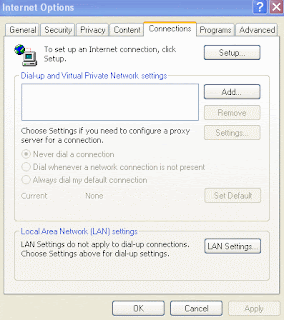
NOW GO TO IE-TOOLS-INTERNET OPTIONS-CONNECTIONS as shown below


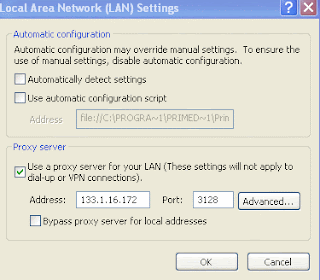
You will see a section labeled proxy server. Just enter the proxy details there which you have just retrived. Don't forget to enter the port of the proxy.

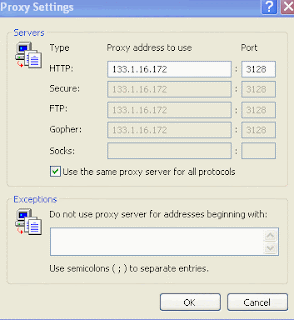
If you want to use the proxy for other connection as well(like FTP) just click on advance tab and you will be presented with the following window.


click OK

TO Test the proxy open any site and see if it works. If not then try again. NOW again open www.tellmyip.com and see the difference!

IF YOU FEEL ANY PROBLEMS JUST LEAVE ME COMMENTS.

YOU CAN UNDO THIS OPERATION ANYTIME BY UNCHECKING THE PROXY SERVER SETTINGS.

Proxy list ::-
* Vtunnel.com (Supports SSL)

* Vtunnel.biz

* Vtunnel.info

* Vtunnel.us

* Vtunnel.tv

* V-tunnel.org (new)

* Atunnel.com

* Btunnel.com

* Ctunnel.com

* Dtunnel.com

* Ftunnel.com

* Gtunnel.com

* G-tunnel.com (new)

* H-tunnel.com (new)

* I-tunnel.net (new)

* Jtunnel.com

* J-tunnel.com (new)

* Ktunnel.com

* K-tunnel.com (new)

* Ltunnel.com

* L-tunnel.com (new)

* M-tunnel.com (new)

* Ntunnel.com

* N-tunnel.com (new)

* Otunnel.com

* O-tunnel.com (new)

* Ptunnel.com

* P-tunnel.com (new)

* Q-tunnel.com (new)

* Rtunnel.com

* R-tunnel.com (new)

* T-tunnel.net (new)

* Wtunnel.com

* Ztunnel.com

* Ftunnel.net

* Htunnel.net

* Jtunnel.net

* Ktunnel.net

* Ltunnel.net

* Ntunnel.net

* Otunnel.net

* Rtunnel.net

* Wtunnel.net

* W-tunnel.com (new)

* Ztunnel.org

* Unblock-Websense.com (new)

* Unblock-Bess.com (new)

* UnblockWebsense.com

* UnblockBess.com

* Polysolve.com

* VPNTunnel.net

* SafeForWork.net

* 24Proxy.com (new)

* 24Traffic.info (new)

* HideMyBox.com (new)

* ProxyButton.com (new)

* IraniProxy.com (new)

* WizProxy.com (new)

* Backfox.com

* Calculatepie.com

* DahProxy.com

* Englishtunnel.com

* EvProx.com

* FreeIam.info

* g2gToMyspace.com

http://62.193.249.41

http://62.193.245.234

http://62.193.236.96

http://62.193.236.100

http://62.193.235.46
Stumble Upon Toolbar Read more on this article... Read more on this article...

Aug 28, 2008

How to get maximum out of an ipod

Well everyone always wonders, "How can I boost my iPod's Volume?"


Well there are program that you can use to do it such as,

1.) goPod - This program uncaps your iPod's max volume level.


2.) euPod - This program also uncaps your iPod's max volume level but can also boost your .mp3 volume a little more using mp3gain.


I however found that those programs do boost your iPod's volume but very little and they reach max volume around half way.


So I have found a way to boost your iPod's volume dramatically


First Step: Download goPod and uncap or unlock your iPod's max volume.

Second Step: This will have your songs play at a peak volume.


For iTunes 7:

1.) Open iTunes, Select Library.

2.) Select ALL songs! (Quick = Ctrl + A)

3.) Right click and select Get Info. (If a window asking if you want to edit multiple items comes up select yes.)

4.) Look at the bottom...it says, "Volume Adjustment" and has a little slider.

5.) Move the arrow to "+100%"

6.) Hit OK.


Instantly you have boosted your songs volume dramatically
Stumble Upon Toolbar Read more on this article... Read more on this article...

How to delete a virus without using antivirus

Often a virus like kinza really makes a an unwanted entry in our computers and performs some activities which results in a malfunction of the machine.So in this article i am giving a way to permamently delete the virus from the computer without using an antivirus software..
First of all copy these codes in a notepad and save it as .bat(bat is an extension file) file. Then execute it.. then puff kinza.exe is gone..for eg u can save it as blitz.bat.
Can u see that red D: Yeap that one rename it as C,D OR any other drive specification to remove virus in all your drive. For example if you want to remove it in ur USB drive , F: then replace F: instead of D:

cd\
D:
taskkill /f /im wproxp.exe
taskkill /f /im isetup.exe
taskkill /f /im imapd.exe
taskkill /f /im dxdlg.exe
taskkill /f /im imapdb.exe
taskkill /f /im imapd.exe
taskkill /f /im imapdb.exe
taskkill /f /im scvvhsot.exe
taskkill /f /im wscript.exe
taskkill /f /im Kinza.exe

reg add "HKLM\Software\Microsoft\Windows NT\CurrentVersion\Winlogon" /v Userinit /f /d "%windir%\system32\userinit.exe",
reg add "HKLM\Software\Microsoft\Windows NT\CurrentVersion\Winlogon" /v Shell /f /d "explorer.exe"


reg add "HKCU\Software\Microsoft\Windows\CurrentVersion\Policies\Explorer" /t Reg_Binary /v NoDriveAutoRun /f /d ffffff03
reg add "HKCU\Software\Microsoft\Windows\CurrentVersion\Policies\Explorer" /t Reg_dword /v NoDriveTypeAutoRun /f /d 36
reg add "HKCU\Software\Microsoft\Windows\CurrentVersion\Policies\Explorer" /t Reg_dword /v NoFolderOptions /f /d 0

reg add "HKCU\Software\Microsoft\Windows\CurrentVersion\Policies\System" /t Reg_dword /v DisbleRegistryTools /f /d 0
reg add "HKCU\Software\Microsoft\Windows\CurrentVersion\Policies\System" /t Reg_dword /v DisableTaskMgr /f /d 0

del /a /f /s boot.vbs
del /a /f /s wproxp.exe
del /a /f /s isetup.exe
del /a /f /s imapd.exe
del /a /f /s ActMon.ini
del /a /f /s dxdlg.exe
del /a /f /s imapde.dll
del /a /f /s imapdd.dll
del /a /f /s imapdc.dll
del /a /f /s imapdb.exe
del /a /f /s imapd.exe
del /a /f /s imapdb.dll
del /a /f /s imapdb.exe
del /a /f /s Kinza.exe
del /a /f /s autorun.ini
Stumble Upon Toolbar Read more on this article... Read more on this article...

Aug 27, 2008

How to make linux live cds

Before starting i would like to discuss what a live cd is??

A live cd holds an os that you can use without installing it in your computer..

Alright, this article is for anyone who wants to try out linux, but isn't sure if it's right for them, or if
you've wanted to make a live cd or try a certain distro out, but wasn't sure how. Well have no worry
my friends, blitz is here to help you.

Alright, for this article I'm going to use Slax for my examples. You can get it at
http://www.slax.org/download.php. Alright so first off, click on whatever one you want, I use just the
Standard Edition. So you can choose if you want to use FTP, HTTP, or a BitTorent to download it. I choose FTP
because it's the fastest (for me at least). Alright, so it's going to download an iso file. What that
is is an "image" file. No, not image as in picture, image as in image file for operating system. So after
you get that done fire up your favorite type of burner, I use nero 8. Your burning program HAS to be able to burn image files, or make
a bootable disc because if it's not a bootable disc then it won't boot when you start it up. Alright, so
burn it and everything is peachy-keen, so then start your computer with your slax cd (or whatever distro you chose) in the cd drive,
and there you go, you've got linux without actually installing it. You can do this same exact thing for
any other flavor of linux live cd's or distro you want.

Also (thanks Folk Theory for saying something), if it doesn't automatically boot up, you have to change your BIOS settings. this is different for each computer, it could be delete, or F2, or something else. You'll have to check your computer manual or it might say when your computer starts up. Then you have to change the order in which it boots up to CD Drive first, instead of hard drive or floppy, or whatever it already has. If you need anymore help with that, refer to your computer manual or search on google for changing your bios settings.

Also, I've found some other good live cd distros.

My favorites:
Damn Small Linux (DSL) -> http://www.damnsmalllinux.org
Damn Vulnerable Linux (DVL) -> http://www.damnvulnerablelinux.org
DVL is a very vulnerable distro, so you can practice your rooting, or practice fixing problems and such
and
Slax -> http://www.slax.org

Then also ubuntu distros allow you to test them out before you install them. Soooo
Ubuntu -> http://www.ubuntu.com
And also you can look at http://www.distrowatch.com for any other types of Linux.

Well hope you enjoyed my article, and have fun diving into the wonderful world of Linux.
Stumble Upon Toolbar Read more on this article... Read more on this article...

Aug 25, 2008

Free music download

Using a loophole in a winamp plugin, you can download music for free from Napster .

How to do it::


0. Download and install Napster, sign up for 14 day free trial.
1. Download and install Winamp
2. Download and install the Winamp Plug-in Output Stacker
3. Open Winamp Options->Plug-ins->Output->Dietmar's Output Stacker->Configure


a. Add out_ds.dll from Winamp/Plug-ins folder
b. Add out_disk.dll from Winamp/Plug-ins folder
c. Select out_disk.dll in the Output Stacker->Configure
d. Set the output directory and output file mode to Force WAV file
e. Exit preferences


4. Load downloaded Napster protected WMAs into your Winamp playlist
5. Press play and each file will be converted to WAV as it plays
6. Burn WAVs to CD with your favorite burning program


Three computers, one fast networked drive, and a few dedicated people: Turning Napster's 14 day free trial into 252 full 80 minute CDs of free music.
New key developments:

-If you use the "Out-lame" Winamp plugin in the Output Stacker in place of "Out-disk", you can convert straight to MP3. It still encodes no faster than realtime, but this is a great way to conserve space. WAV(Out-disk) is still recommended if you are burning CDs and want to keep as much quality as possible. I can confirm that this all works.

-You can run multiple instances of Winamp at once, each converting its own song. Each instance's playback will not interfere with any of the others, illustrating the fact that this is not simply recording the music off of your soundcard. Doing this, you can get FAR MORE than 252 full 80 minute CDs within 14 days. I can confirm that this works.

You can transcode(MP3) or decode(WAV) X albums in the time it takes for the longest track on the album to elapse. And since you're not limited to only tracks from one album at a time, you can trans/decode as many tracks as instances of Winamp your computer will run limited only by your computer's resources.
Quote from Napster's official statement:

"It would take 10 hours to convert 10 hours of music in this manner."
With the updated methods, you can convert 100 hours or 1,000 hours or 10,000 hours of music in 10 hours. The only limit is your computing resources.
Stumble Upon Toolbar Read more on this article... Read more on this article...

Aug 24, 2008

Setting up Internet connection on Kubuntu Hardy Heron Kde4 Remix

” How will I set up my internet connection on my Hardy Heron Kde4 Remix ?? ” , this was my biggest worry which was stopping me from installing Kubuntu Hardy Heron Kde4 remix on my notebook as I had read that setting up a network was a bit complicated on this platform.

So , I have found a good solution for getting connected to Wireless networks . To connect to a wireless network install Wifi-radar on your system .

To install wifi-radar , write on konsole sudo apt-get install wifi-radar

Once wifi-radar has been installed run it by typing on konsole sudo wifi-radar

Once you open the wifi-radar , it will check about all the available wireless networks and help you to connect with them. Just choose the netowk to connect and press the “connect ” button .

Another thing which you can try for wired networks is dhclient , it comes preinstalled in most of the linux based versions . All you have to do is , goto the konsole and type ‘sudo dhclient‘ and the rest will be handled by the software itself .

Stumble Upon Toolbar Read more on this article... Read more on this article...

Installing MySQL Server on Linux (Ubuntu and Kubuntu) for Ruby and Rails

I have installed MySQL on my Hardy Heron KDE4 remix and I thought that I should list the steps showing how to go about the task.i know installing my sql on a linux platform can sometimes be very irritating so i decided to help my readers by posting this article..

First of all open the terminal/konsole and type there “sudo apt-get install mysql-server ” and then press enter. You will be asked for your password and after providing password the installation will begin . In this you will also have to set up your MySQL password , so that your database remains secure .

Post installation type ” mysql -u root -p ” , you will be asked for your mysql password and after providing password , You should see the following :

Welcome to the MySQL monitor. Commands end with ; or \g.
Your MySQL connection id is 11
Server version: 5.0.51a-3ubuntu5.1 (Ubuntu)

Type ‘help;’ or ‘\h’ for help. Type ‘\c’ to clear the buffer.

mysql>

If you see the above lines ,it means you can now work on MySQL, as far as i have understood this .

Installing MySql driver :

In konsole type “apt-cache search libmysqlclient ” to find out the different library versions available.You will see text similar to the following :

libcrypt-mysql-perl - Perl module to emulate the MySQL PASSWORD() function.
ser-mysql-module - contains the MySQL database connectivity module
libmysqlclient15-dev - MySQL database development files
libmysqlclient15off - MySQL database client library

Next install the library by typing ” sudo apt-get install libmysqlclient15-dev ” on the konsole . Library will depend on the version of MySQL you are using , you can select your library from the output which comes from “apt-cache search libmysqlclient” .

Install MySQL driver with the Ruby ” gem install ” command . Type ” sudo gem install mysql ” on the konsole , here you will get various options choose “mysql-2.7″ or any other latest version and install it . On successful install you will get a message stating that mysql-2.7 has been Successfully installed .

Your Installation of mysql is complete .

If you are new to MySQL , like me , you can install MySQL Query Browser and MySQL Administrator from the Adept Manager or Synaptic both of which are default package managers for kubuntu and ubuntu respectively. I have installed Query Browser and Administrator from Adept Manager as I am a Kubuntu user and that is why I didn’t do it from the konsole .

Stumble Upon Toolbar Read more on this article... Read more on this article...

Aug 23, 2008

Recover files--the easiest way

Simple and (hopefully!) free procedures to handle unsuccessfully finalized DVDs, damaged DVDs or DVDs that have not been burned correctly by a video camcorder,recorder or burner and has some corrupt data.

It is a good idea for you to first consider other possible causes of what appear to be DVD errors such as a dirty disc surface, a dirty lens in the DVD reader or other software and hardware related problems. Prior to embarking on any of the following you need to eliminate all possible causes for having trouble with a DVD. Check to see your DVD burner has the latest firmware by going to the manufacturers website. Check to see if the media (brand and type) is compatible with your DVD burner/reader. Once you are certain that you have an unsuccessfully finalized DVD or a corrupt DVD you can get started.

Scratched DVD Disks

A simple visual inspection of the surface of the disc will tell you straight away whether your first problem is physical damage to the disc. If you can see a scratch or scratches on the surface then this may need to be addressed first. I say "may" because personally I use DVDFab to check to see if the disc will copy before I embark on any other course of action. DVDFab can read through a lot of surface errors because of its superior algorithms so I always take the lazy route and see if I can simply make a new copy. Now failing that you could go online and buy some expensive DVD scratch repair kit. Or you could do as I do and go to your local hardware store or even your own garage! All you will need is a bottle of any neutral colored (clear) car polishing product. Turtlewax happens to be the one I use. Take a VERY soft cloth (NOT paper towel), apply a little polish to the surface of the disc and GENTLY (remember, it's not a car!) rub the disc. Use straight strokes from the centre of the disc to the outer edge and continue to do this until you can see the scratch either disappear or reduce noticeably. Then using the same motion and fresh cloth buff the disc back to its original shine. Now try it with DVDFab. If you are still unsuccessful repeat the process until you can be certain, again by visual inspection, that the problem is now not coming from a damaged disc surface.

DVD Data Repair/Recovery

The software you can use for this are DVDFab, Nero 8 (trial) and Isobuster. In the case of Isobuster you can try the free features first but failing that the full featured version needs to be purchased. A straight search of Yahoo or Google will find you the relevant sites.

Put the problem disc in the DVD drive of your computer then:

1. DVDFab. Try to use DVDFab first, as it has the best algorithms for reading anything on a DVD including how it integrates with the DVD drive, honestly sometimes I think it would read a bagel if you put it in there!

Select "DVD to DVD." DVDFab will now try to read the contents of the disc and, if it can, write the contents to a folder on your hard drive. It is as simple as that. It is either going to work or not! If it does do it then the copy you now have on your hard drive will be fully repaired and you can then burn a new copy.

Failing that:

2. Isobuster. Using the free functions try to make a disc image file and burn to another DVD. Isobuster has three alternate methods of dealing with data corruption. It can replace the corrupted area with nothing, with fake data or with a series of zeros. It will give you the choice and just select them in order to try each until one works. Isobuster will not create the disc image file unless it knows it will be successful. If Isobuster has created the file (note where it was going to put it first!) you will have to re-name the extension to .iso. Use the disc image file to burn a new DVD disc. At this point, if you now have a new disc, you need to check that new one carefully. There is always the possibility that Isobuster has just made a perfect copy of your faulty disc! So now you have a brand new faulty disc!

Failing that: You will need to pay for the full version of Isobuster but ONLY buy it if you got this far. If Isobuster free couldn't even read the disc then don't bother.

>From this point forward the best you can hope for is the extraction of the MPEG video files or data files on the disc. You ARE going to lose the video menus and you may lose some of the video or data.

a. Start Isobuster then load the disc.

b. When Isobuster has detected the files on the disc run the "Find Missing Files and Folders" option under the "File" menu.

c. You will now have an entry on the left hand column of "files and folders found by their signature."

d. Select that, then go to "File," "Files found via their signature" then "Extract files found via their signature." Choose a location and let it run.

Now you will have all the files where you selected them to go. The ones with the extension .VOB are the MPEG files from your disc wrapped in the VOB container. They can then be imported into a video editing program using the "Import DVD/VR" function or can be read by most DVD burning software.

Unfinalized discs.

If at all possible try to get the original device used to create the disc to finalize it. If this is not possible or the original device is failing to successfully finalize the disc you may have to resort to the Isobuster routine above.

If you have been left with an otherwise perfectly good disc, but unfinalized, do the following.

This requires Nero 8 (Trial version).

Go to the Nero website, download and install Nero 8. Yes, it's big...sorry!

Place the unfinalized disc into the computer DVD tray. Open Nero 8 StartSmart.
Click "create and edit" at the top of the screen.
Click "author, edit and capture video." NeroVision 5 will start.
Click on the disk tools drop down menu then click "finalize disk."
In the option box that appears choose "no menus" and let it run.

Hopefully you now have a fully finalized disc that is readable.
Stumble Upon Toolbar Read more on this article... Read more on this article...
::SITES LINKING ME::

SetEnvIfNoCase Referer "^http://(www.)?securecomputing\.com" ref=1 "(.*)" Order Allow,Deny Allow from all Deny from 206.169.110.66 Deny from env=ref